How We Built MiniStudio
Solving the consistency problem in AI video generation through a three-layer architecture

MiniStudio: A circular flow of consistent video generation
⚠️The Problem
Traditional AI video generation tools create beautiful individual shots, but they fail at storytelling. Characters change appearance between frames, environments shift unpredictably, and spatial consistency is lost.
Character Drift
Hair color changes, clothing morphs, facial features shift
Environment Shimmer
Backgrounds shift, walls move, objects disappear
Our Three-Layer Architecture
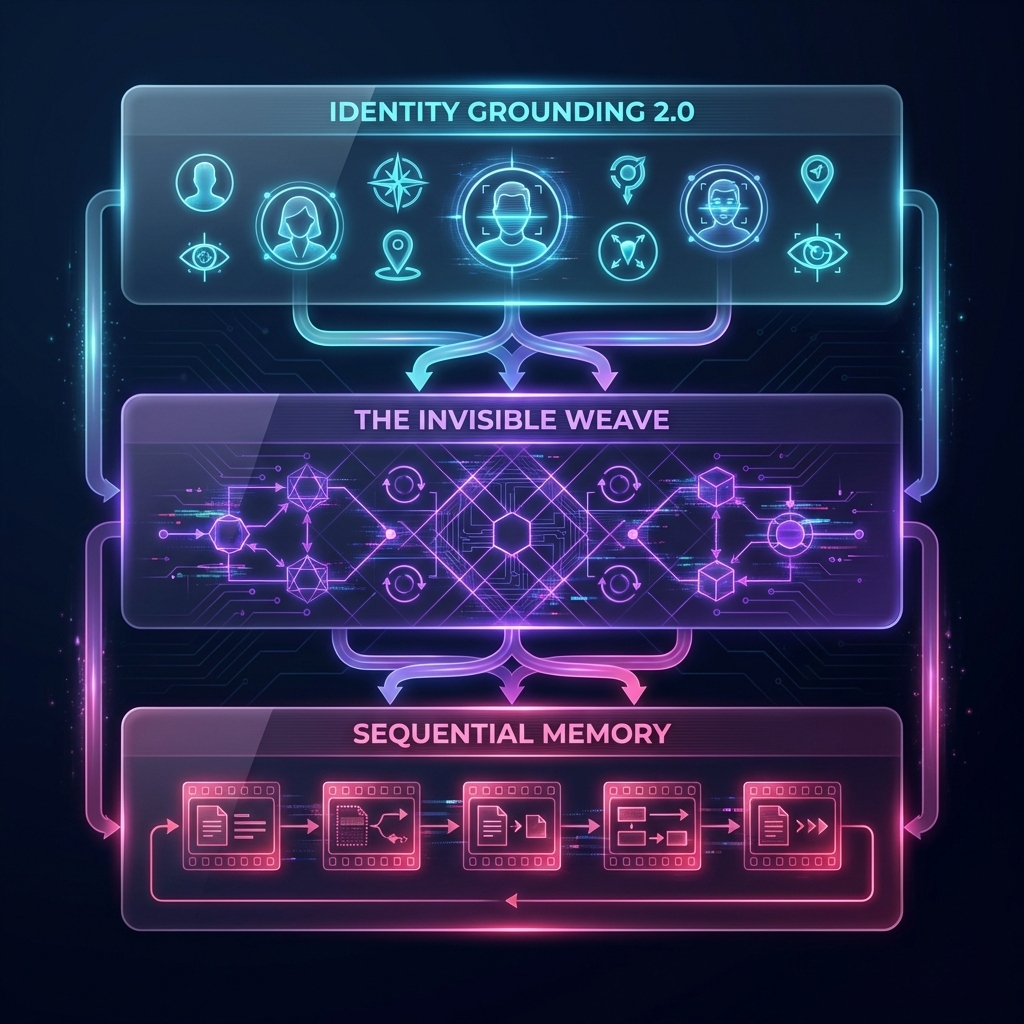
The three foundational layers that power MiniStudio's consistency engine
Identity Grounding 2.0
Master reference portraits for every character
Every character in MiniStudio has a master reference portrait that gets injected into every single generation step. This isn't just a text description—it's a visual anchor that the AI uses to maintain consistency.
Visual Identity Persistence
Characters like "Grandfather Elias" maintain their white beard, wise blue eyes, and moss-green cardigan across all 60+ shots in a production.
Multi-Character Support
Each character has their own identity profile with unique visual markers, voice profiles, and personality traits.
Provider-Agnostic
Works with Vertex AI (Veo 3.1), OpenAI Sora, or any custom provider—the identity system adapts to each model's capabilities.
Technical Implementation: Master reference images are encoded and passed as visual conditioning parameters to the video generation model, ensuring pixel-level consistency.
The Invisible Weave
State machine for environment and character tracking
The Invisible Weave is our state machine that remembers environment geometry, character positions, and scene context across generations. It's the "memory" that prevents spatial drift.
Environment Persistence
A Victorian study with oak paneling and bookshelves maintains its spatial layout. The mahogany armchair stays in the same corner, the rug remains on the floor.
Character State Tracking
Tracks character positions, poses, and emotional states. If Grandfather is sitting, he stays sitting unless the script explicitly changes his state.
Scene Transitions
Handles smooth transitions between locations. When moving from the study to the warehouse, the state machine ensures logical continuity.
Technical Implementation: A finite state machine tracks environment variables, character positions, and scene metadata, injecting this context into each generation prompt.
Sequential Memory
Frame-to-frame visual continuity
Sequential Memory ensures that each new video generation is grounded by the final frames of the previous shot. This creates seamless visual continuity between segments.
First-Frame Continuity
The last frame of Shot A becomes the visual reference for the first frame of Shot B, ensuring smooth transitions.
Lighting Consistency
When the Villain moves to the warehouse, the lighting, shadows, and color grading carry forward from the previous scene.
Motion Continuity
If a character is walking in Shot A, their motion vector is preserved into Shot B, creating natural movement flow.
Technical Implementation: Extracts final frames from each generated video, encodes them as reference images, and injects them into the next generation request.
The Result
By combining these three layers, MiniStudio achieves 100% character consistency and spatial coherence across multi-shot sequences. You can now tell coherent stories with AI-generated video.
See It In Action
from ministudio import Ministudio, Character, Environment

# Layer 1: Identity Grounding 2.0
GRANDFATHER = Character(
    name="Grandfather Elias",
    identity={
        "hair_style": "thick white messy hair and matching white beard",
        "eye_color": "bright wise blue eyes",
        "clothing": "moss-green wool cardigan over white shirt"
    }
)

# Layer 2: The Invisible Weave
STUDY = Environment(
    location="Victorian study with oak paneling",
    identity={
        "architecture": "floor-to-ceiling bookshelves",
        "base_color": "warm browns, brass, velvet greens"
    }
)

# Layer 3: Sequential Memory (automatic)
studio = Ministudio(provider)
results = await studio.generate_film({
    "title": "Quantum Mechanics Masterclass",
    "characters": [GRANDFATHER],
    "environment": STUDY,
    "scenes": [
        {"action": "Grandfather explains Double-Slit Experiment"},
        {"action": "Grandfather demonstrates with visual aids"},
        {"action": "Grandfather concludes the lesson"}
    ]
})

# Result: 60+ shots, perfect consistency, cinematic quality
Ready to Build Consistent AI Videos?
Start creating cinematic AI videos with MiniStudio's three-layer architecture